August 25,2016
To download and install latest android APIs and development tools from the internet, android provide us with android SDK manager. Android SDK Manager separates the APIs, tools and different platforms into different packages which you can download.
Android SDK manager comes with the Android SDK bundle. You can’t download it separately. You can download the android sdk from here.
Running Android SDK Manager
Once downloaded, you can launch Android SDK Manager in one of the following ways −
- Click tools->Android-> SDK Manager option in Eclipse.
- Double Click on the SDK Manager.exe file in the Android SDK folder.
When it runs you will see the following screen −
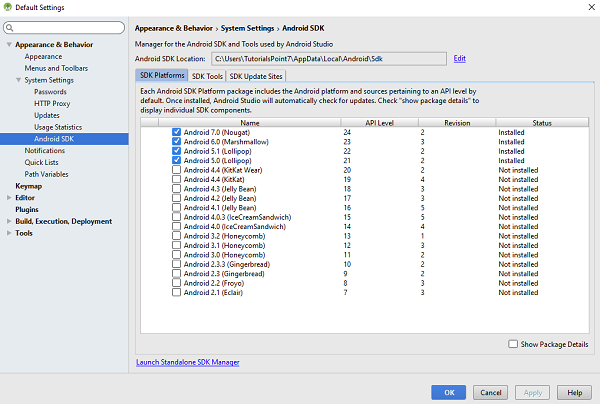
You can select which package you want to download by selecting the checkbox and then click Install to install those packages. By default SDK Manager keeps it up to date with latest APIs and other packages.
Once you download the SDK, following packages are available but first three are necessary to run your SDK and others are recommended.
Recommended Packages
| Sr.No | Package & Description |
|---|---|
| 1 | SDK Tools
This is necessary package to run your SDK. |
| 2 | SDK Platform-tools
This package will be installed once when you first run the SDK manager. |
| 3 | SDK Platform
At least one platform must be installed in your environment to run your application. |
| 4 | System Image
It’s a good practice to download system images for all of the android versions so you can test your app on them with the Android Emulator. |
| 5 | SDK Samples
This will give you some sample codes to learn about android. |
 Site Title