Java – while,do-while loop,Break and Continue statement

Today i have learnt about the while loop,do-while loop and the decision making statements like break and continue statement.

June 20,2016

Java While Loop

The Java while loop is used to iterate a part of the program several times. If the number of iteration is not fixed, it is recommended to use while loop.

Syntax:

  1. while(condition){
  2. //code to be executed
  3. }

Java do-while Loop

The Java do-while loop is used to iterate a part of the program several times. If the number of iteration is not fixed and you must have to execute the loop at least once, it is recommended to use do-while loop.

The Java do-while loop is executed at least once because condition is checked after loop body.

Syntax:

  1. do{
  2. //code to be executed
  3. }while(condition);

Java Break Statement

The Java break is used to break loop or switch statement. It breaks the current flow of the program at specified condition. In case of inner loop, it breaks only inner loop.

Syntax:

  1. jump-statement;
  2. break;

Java Continue Statement

The Java continue statement is used to continue loop. It continues the current flow of the program and skips the remaining code at specified condition. In case of inner loop, it continues only inner loop.

Syntax:

  1. jump-statement;
  2. continue;

Java-Loop control(if & for loop)

Today i have learnt the working of if loop and for loop in java.

June 17,2016

Java If-else Statement

The Java if statement is used to test the condition. It checks boolean condition: true or false. There are various types of if statement in java.

  • if statement
  • if-else statement
  • nested if statement
  • if-else-if ladder

Java IF Statement

The Java if statement tests the condition. It executes the if block if condition is true.

Syntax:

  1. if(condition){
  2. //code to be executed
  3. }

Java IF-else Statement

The Java if-else statement also tests the condition. It executes the if block if condition is true otherwise else block is executed.

Syntax:

  1. if(condition){
  2. //code if condition is true
  3. }else{
  4. //code if condition is false
  5. }

Java IF-else-if ladder Statement

The if-else-if ladder statement executes one condition from multiple statements.

Syntax:

  1. if(condition1){
  2. //code to be executed if condition1 is true
  3. }else if(condition2){
  4. //code to be executed if condition2 is true
  5. }
  6. else if(condition3){
  7. //code to be executed if condition3 is true
  8. }
  9. else{
  10. //code to be executed if all the conditions are false
  11. }

Java Switch Statement

The Java switch statement executes one statement from multiple conditions. It is like if-else-if ladder statement.

Syntax:

  1. switch(expression){
  2. case value1:
  3.  //code to be executed;  
  4.  break;  //optional
  5. case value2:
  6.  //code to be executed;  
  7.  break;  //optional
  8. ……
  9. default:
  10.  code to be executed if all cases are not matched;
  11. }

Java For Loop

The Java for loop is used to iterate a part of the program several times. If the number of iteration is fixed, it is recommended to use for loop.

There are three types of for loop in java.

  • Simple For Loop
  • For-each or Enhanced For Loop
  • Labeled For Loop

Java Simple For Loop

The simple for loop is same as C/C++. We can initialize variable, check condition and increment/decrement value.

Syntax:

  1. for(initialization;condition;incr/decr){
  2. //code to be executed
  3. }

Java For-each Loop

The for-each loop is used to traverse array or collection in java. It is easier to use than simple for loop because we don’t need to increment value and use subscript notation.

It works on elements basis not index. It returns element one by one in the defined variable.

Syntax:

  1. for(Type var:array){
  2. //code to be executed
  3. }

Java Labeled For Loop

We can have name of each for loop. To do so, we use label before the for loop. It is useful if we have nested for loop so that we can break/continue specific for loop.

Normally, break and continue keywords breaks/continues the inner most for loop only.

Syntax:

  1. labelname:
  2. for(initialization;condition;incr/decr){
  3. //code to be executed
  4. }

OPERATORS IN JAVA

(June 16,2016)

Today i have learnt about the operators used in java.

Operators:-

Operator in java is a symbol that is used to perform operations. There are many types of operators in java such as unary operator, arithmetic operator, relational operator, shift operator, bitwise operator, ternary operator and assignment operator.

Java provides a rich set of operators to manipulate variables. We can divide all the Java operators into the following groups:

  •  Arithmetic Operators
  •  Relational Operators
  •  Bitwise Operators
  •  Logical Operators
  •  Assignment Operators
  •  Misc Operators

Arithmetic operators:-

1411_operater

Relational operators:-

1574_relational20operator

Bitwise operaors:-

2-java-operators-10-638

Logical operators:-

oca-java-3-programming-with-java-operators-11-638

Assignment operators:-

java2-1-7

Misc operators:-

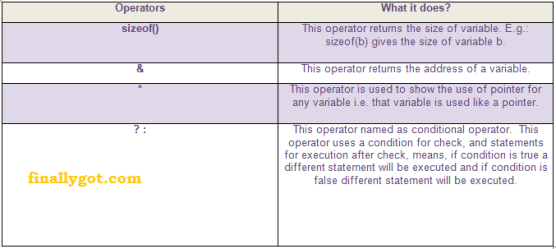
c2boperators2bmisc2boperators-finallygot


VARIABLES AND DATA TYPES IN JAVA

(June 15,2016)

Today, i have learnt about the variables and data types in java and their use.

Variables:-

Variable is name of reserved area allocated in memory. In other words, it is a name of memory location. It is a combination of “vary + able” that means its value can be changed.

typesofvariable

1) Local Variable

A variable which is declared inside the method is called local variable.

2) Instance Variable

A variable which is declared inside the class but outside the method, is called instance variable . It is not declared as static.

3) Static variable

A variable that is declared as static is called static variable. It cannot be local.

Data Types:-

Data types represent the different values to be stored in the variable. In java, there are two types of data types:

  • Primitive data types
  • Non-primitive data types      datatype2


BASIC SYNTAX IN JAVA

(June 14,2016)

Today i come to know the basic syntax of java and some important point related with it.

Simple java program:- “Hello Java”

  1. class Simple{
  2.     public static void main(String args[]){
  3.      System.out.println(“Hello Java”);
  4.     }
  5. }

Let’s see what is the meaning of class, public, static, void, main, String[], System.out.println().

  • class keyword is used to declare a class in java.
  • public keyword is an access modifier which represents visibility, it means it is visible to all.
  • static is a keyword, if we declare any method as static, it is known as static method. The core advantage of static method is that there is no need to create object to invoke the static method. The main method is executed by the JVM, so it doesn’t require to create object to invoke the main method. So it saves memory.
  • void is the return type of the method, it means it doesn’t return any value.
  • main represents startup of the program.
  • String[] args is used for command line argument. We will learn it later.
  • System.out.println() is used print statement. We will learn about the internal working of System.out.println statement later.

About Java programs, it is very important to keep in mind the following points.

  •  Case Sensitivity – Java is case sensitive, which means identifier Hello and hello would have different meaning in Java.
  • Class Names – For all class names the first letter should be in Upper Case. If several words are used to form a name of the class, each inner word’s first letter should be in Upper Case.Example: class MyFirstJavaClass.
  • Method Names – All method names should start with a Lower Case letter. If several words are used to form the name of the method, then each inner word’s first letter should be in Upper Case. Example: public void myMethodName().
  • Program File Name – Name of the program file should exactly match the class name. When saving the file, you should save it using the class name (Remember Java is case sensitive) and append ‘.java’ to the end of the name (if the file name and the class name do not match, your program will not compile). Example: Assume ‘MyFirstJavaProgram’ is the class name. Then the file should be saved as ‘MyFirstJavaProgram.java’.
  • public static void main(String args[]) – Java program processing starts from the main() method which is a mandatory part of every Java program.

Java-What,Where and Why?

(June 13,2016)

Today i have learnt that what is java, what is its applications and where it is used.Also i have learnt about JVM i.e. Java Virtual Machine.

What is Java:-

Java is a programming language and a platform. It is a high level, robust, secured      and object-oriented programming language.

Platform: Any hardware or software environment in which a program runs, is known as a platform. Since Java has its own runtime environment (JRE) and API, it is called platform. It is guaranteed to be Write Once, Run Anywhere.

Where it is used:-

There are many devices where java is currently used. Some of them are as follows:

  1. Desktop Applications such as acrobat reader, media player, antivirus etc.
  2. Web Applications such as irctc.co.in, javatpoint.com etc.
  3. Enterprise Applications such as banking applications.
  4. Mobile
  5. Embedded System
  6. Smart Card
  7. Robotics
  8. Games etc.

Types of java applications:-

There are mainly 4 type of applications that can be created using java programming:

1) Standalone Application

It is also known as desktop application or window-based application. An application that we need to install on every machine such as media player, antivirus etc. AWT and Swing are used in java for creating standalone applications.

2) Web Application

An application that runs on the server side and creates dynamic page, is called web application. Currently, servlet, jsp, struts, jsf etc. technologies are used for creating web applications in java.

3) Enterprise Application

An application that is distributed in nature, such as banking applications etc. It has the advantage of high level security, load balancing and clustering. In java, EJB is used for creating enterprise applications.

4) Mobile Application

An application that is created for mobile devices. Currently Android and Java ME are used for creating mobile applications.

Java Virtual Machine(J.V.M):-

It is:

  1. A specification where working of Java Virtual Machine is specified. But implementation provider is independent to choose the algorithm. Its implementation has been provided by Sun and other companies.
  2. An implementation Its implementation is known as JRE (Java Runtime Environment).
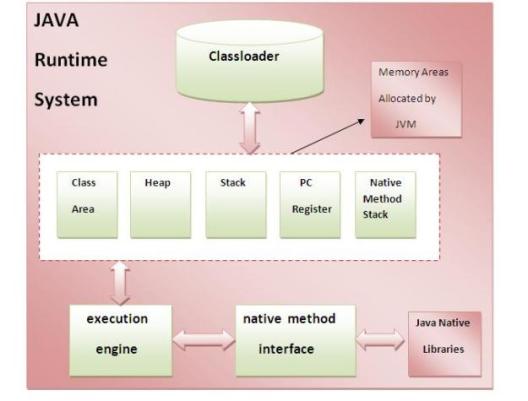
  3. Runtime Instance Whenever you write java command on the command prompt to run the java class, an instance of JVM is created.jvminternal