Android-Fragments

July 15,2016

Today i come to know about the fragments used in android.

Android Fragment is the part of activity, it is also known as sub-activity. There can be more than one fragment in an activity. Fragments represent multiple screen inside one activity.

Android fragment lifecycle is affected by activity lifecycle because fragments are included in activity.

Each fragment has its own life cycle methods that is affected by activity life cycle because fragments are embedded in activity.

The FragmentManager class is responsible to make interaction between fragment objects.

Android Fragment Lifecycle

The lifecycle of android fragment is like the activity lifecycle. There are 12 lifecycle methods for fragment.

No. Method Description
1) onAttach(Activity) it is called only once when it is attached with activity.
2) onCreate(Bundle) It is used to initialize the fragment.
3) onCreateView(LayoutInflater, ViewGroup, Bundle) creates and returns view hierarchy.
4) onActivityCreated(Bundle) It is invoked after the completion of onCreate() method.
5) onViewStateRestored(Bundle) It provides information to the fragment that all the saved state of fragment view hierarchy has been restored.
6) onStart() makes the fragment visible.
7) onResume() makes the fragment interactive.
8) onPause() is called when fragment is no longer interactive.
9) onStop() is called when fragment is no longer visible.
10) onDestroyView() allows the fragment to clean up resources.
11) onDestroy() allows the fragment to do final clean up of fragment state.
12) onDetach() It is called immediately prior to the fragment no longer being associated with its activity.


Android-Content Provider

July 14,2016

Today i have learnt about the content provider.

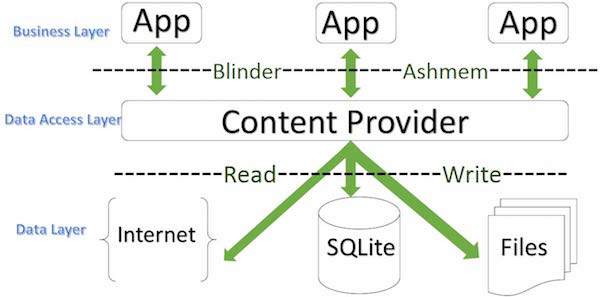
A content provider component supplies data from one application to others on request. Such requests are handled by the methods of the ContentResolver class. A content provider can use different ways to store its data and the data can be stored in a database, in files, or even over a network.

content provider

CONTENTPROVIDER

sometimes it is required to share data across applications. This is where content providers become very useful.

Content providers let you centralize content in one place and have many different applications access it as needed. A content provider behaves very much like a database where you can query it, edit its content, as well as add or delete content using insert(), update(), delete(), and query() methods. In most cases this data is stored in an SQlite database.

A content provider is implemented as a subclass of ContentProvider class and must implement a standard set of APIs that enable other applications to perform transactions.

Android Broadcast Receivers

July 13,2016

Today i come to know what is broadcast receiver and its fuctionality.

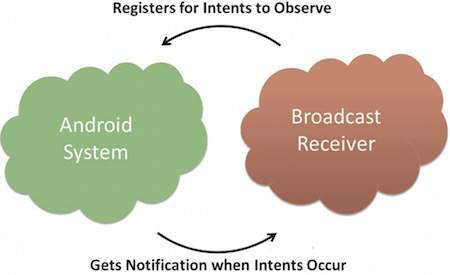
Broadcast Receivers simply respond to broadcast messages from other applications or from the system itself. These messages are sometime called events or intents. For example, applications can also initiate broadcasts to let other applications know that some data has been downloaded to the device and is available for them to use, so this is broadcast receiver who will intercept this communication and will initiate appropriate action.

There are following two important steps to make BroadcastReceiver works for the system broadcasted intents −

  • Creating the Broadcast Receiver.
  • Registering Broadcast Receiver

There is one additional steps in case you are going to implement your custom intents then you will have to create and broadcast those intents.

Creating the Broadcast Receiver

A broadcast receiver is implemented as a subclass of BroadcastReceiver class and overriding the onReceive() method where each message is received as a Intent object parameter.

Registering Broadcast Receiver

An application listens for specific broadcast intents by registering a broadcast receiver in AndroidManifest.xml file. Consider we are going to register MyReceiver for system generated event ACTION_BOOT_COMPLETED which is fired by the system once the Android system has completed the boot process.

broadcast

Android Services

July 12,2016

Today i come to know about the detailed services in android.

Services:

Android service is a component that is used to perform operations on the background such as playing music, handle network transactions, interacting content providers etc. It doesn’t has any UI (user interface).

The service runs in the background indefinitely even if application is destroyed.

Life Cycle of Android Service

There can be two forms of a service.The lifecycle of service can follow two different paths: started or bound.

  1. Started
  2. Bound

1) Started Service

A service is started when component (like activity) calls startService() method, now it runs in the background indefinitely. It is stopped by stopService() method. The service can stop itself by calling the stopSelf() method.

2) Bound Service

A service is bound when another component (e.g. client) calls bindService() method. The client can unbind the service by calling the unbindService() method.

The service cannot be stopped until all clients unbind the service.

service lifecycle

Android – Activities & Life-Cycle

July 11,2015

Today i come to know about activities in detail.

Activity

An activity represents a single screen with a user interface just like window or frame of Java.Android activity is the subclass of ContextThemeWrapper class.

Android Activity Lifecycle

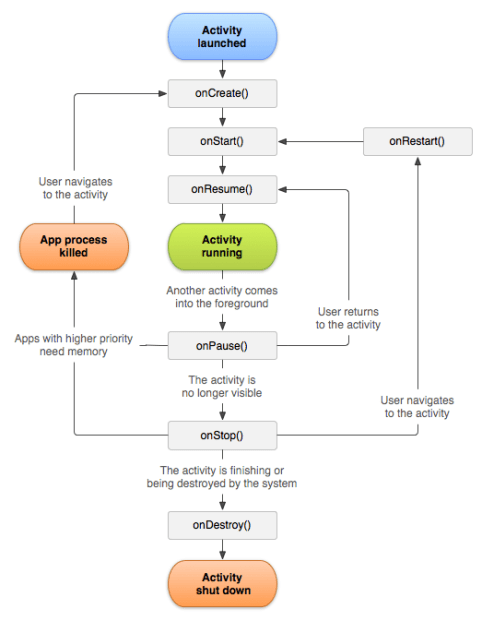
Android Activity Lifecycle is controlled by 7 methods of android.app.Activity class. The android Activity is the subclass of ContextThemeWrapper class.

An activity is the single screen in android. It is like window or frame of Java.

By the help of activity, you can place all your UI components or widgets in a single screen.

The 7 lifecycle method of Activity describes how activity will behave at different states.

android-activity-lifecycle

Android Resources Organizing & Accessing

July 8,2016

Today i come to know about some resources that are used in android.

There are many more items which you use to build a good Android application. Apart from coding for the application, you take care of various other resources like static content that your code uses, such as bitmaps, colors, layout definitions, user interface strings, animation instructions, and more. These resources are always maintained separately in various sub-directories under res/ directory of the project.

Sr.No. Directory & Resource Type
1 anim/

XML files that define property animations. They are saved in res/anim/ folder and accessed from the R.anim class.

2 color/

XML files that define a state list of colors. They are saved in res/color/ and accessed from the R.color class.

3 drawable/

Image files like .png, .jpg, .gif or XML files that are compiled into bitmaps, state lists, shapes, animation drawable. They are saved in res/drawable/ and accessed from the R.drawable class.

4 layout/

XML files that define a user interface layout. They are saved in res/layout/ and accessed from the R.layout class.

5 menu/

XML files that define application menus, such as an Options Menu, Context Menu, or Sub Menu. They are saved in res/menu/ and accessed from the R.menu class.

6 raw/

Arbitrary files to save in their raw form. You need to call Resources.openRawResource() with the resource ID, which is R.raw.filename to open such raw files.

7 values/

XML files that contain simple values, such as strings, integers, and colors. For example, here are some filename conventions for resources you can create in this directory −

  • arrays.xml for resource arrays, and accessed from the R.array class.
  • integers.xml for resource integers, and accessed from the R.integer class.
  • bools.xml for resource boolean, and accessed from the R.bool class.
  • colors.xml for color values, and accessed from the R.color class.
  • dimens.xml for dimension values, and accessed from the R.dimen class.
  • strings.xml for string values, and accessed from the R.string class.
  • styles.xml for styles, and accessed from the R.style class.
8 xml/

Arbitrary XML files that can be read at runtime by calling Resources.getXML(). You can save various configuration files here which will be used at run time.


Android Emulator

July 7,2016

Today i come to know what is emulator and how it is working and how an application will be run on emulator.

Android Emulator

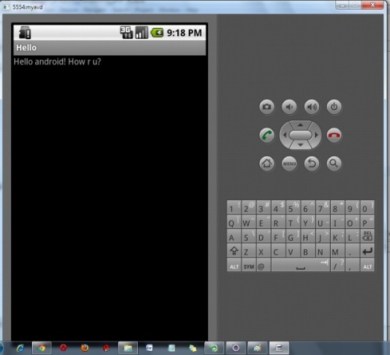
Android Emulator is used to run, debug and test the android application. If you don’t have the real device, it can be the best way to run, debug and test the application.

It uses an open source processor emulator technology called QEMU.

The emulator tool enables you to start the emulator from the command line. You need to write:

emulator -avd <AVD NAME>

In case of Eclipse IDE, you can create AVD by Window menu > AVD Manager > New.

andoutput

Android-Application components

July 6,2016

Today i come to know about the android core building i.e. the components that are necessary for the android applicaton.

Android Core Building Blocks

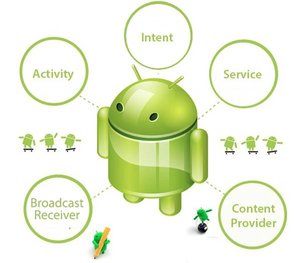
An android component is simply a piece of code that has a well defined life cycle e.g. Activity, Receiver, Service etc.

The core building blocks or fundamental components of android are activities, views, intents, services, content providers, fragments and AndroidManifest.xml.

componentsandroid1

Activity

An activity is a class that represents a single screen. It is like a Frame in AWT.

View

A view is the UI element such as button, label, text field etc. Anything that you see is a view.

Intent

Intent is used to invoke components. It is mainly used to:

  • Start the service
  • Launch an activity
  • Display a web page
  • Display a list of contacts
  • Broadcast a message
  • Dial a phone call etc.

Service

Service is a background process that can run for a long time.

There are two types of services local and remote. Local service is accessed from within the application whereas remote service is accessed remotely from other applications running on the same device.


Content Provider

Content Providers are used to share data between the applications.


Fragment

Fragments are like parts of activity. An activity can display one or more fragments on the screen at the same time.


AndroidManifest.xml

It contains informations about activities, content providers, permissions etc. It is like the web.xml file in Java EE.


Android Virtual Device (AVD)

It is used to test the android application without the need for mobile or tablet etc. It can be created in different configurations to emulate different types of real devices.

Android Architecture

July 5,2016

Today i come to know about android architecture and its layers.

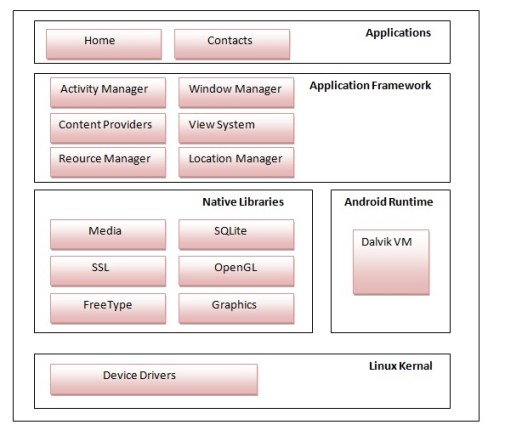
Android architecture or Android software stack is categorized into five parts:

  1. linux kernel
  2. native libraries (middleware),
  3. Android Runtime
  4. Application Framework
  5. Applicationssoftwarestack

1) Linux kernel

It is the heart of android architecture that exists at the root of android architecture. Linux kernel is responsible for device drivers, power management, memory management, device management and resource access.


2) Native Libraries

On the top of linux kernel, their are Native libraries such as WebKit, OpenGL, FreeType, SQLite, Media, C runtime library (libc) etc.

The WebKit library is responsible for browser support, SQLite is for database, FreeType for font support, Media for playing and recording audio and video formats.


3) Android Runtime

In android runtime, there are core libraries and DVM (Dalvik Virtual Machine) which is responsible to run android application. DVM is like JVM but it is optimized for mobile devices. It consumes less memory and provides fast performance.


4) Android Framework

On the top of Native libraries and android runtime, there is android framework. Android framework includes Android API’s such as UI (User Interface), telephony, resources, locations, Content Providers (data) and package managers. It provides a lot of classes and interfaces for android application development.


5) Applications

On the top of android framework, there are applications. All applications such as home, contact, settings, games, browsers are using android framework that uses android runtime and libraries. Android runtime and native libraries are using linux kernal.


What is Android???

July 4,2016

Today i have come to know the introduction of android,its application and its features.

What is Android?

Android is an open source and Linux-based Operating System for mobile devices such as smartphones and tablet computers. Android was developed by the Open Handset Alliance, led by Google, and other companies.

It contains a linux-based Operating System, middleware and key mobile applications.

It can be thought of as a mobile operating system. But it is not limited to mobile only. It is currently used in various devices such as mobiles, tablets, televisions etc.

It is developed by Google and later the OHA (Open Handset Alliance). Java language is mainly used to write the android code even though other languages can be used.

The goal of android project is to create a successful real-world product that improves the mobile experience for end users.

Features of Android

After learning what is android, let’s see the features of android. The important features of android are given below:

1) It is open-source.

2) Anyone can customize the Android Platform.

3) There are a lot of mobile applications that can be chosen by the consumer.

4) It provides many interesting features like weather details, opening screen, live RSS (Really Simple Syndication) feeds etc.

It provides support for messaging services(SMS and MMS), web browser, storage (SQLite), connectivity (GSM, CDMA, Blue Tooth, Wi-Fi etc.), media, handset layout etc.

Android Applications

Android applications are usually developed in the Java language using the Android Software Development Kit.

Once developed, Android applications can be packaged easily and sold out either through a store such as Google Play, SlideME, Opera Mobile Store, Mobango, F-droid and the Amazon Appstore.

History of Android

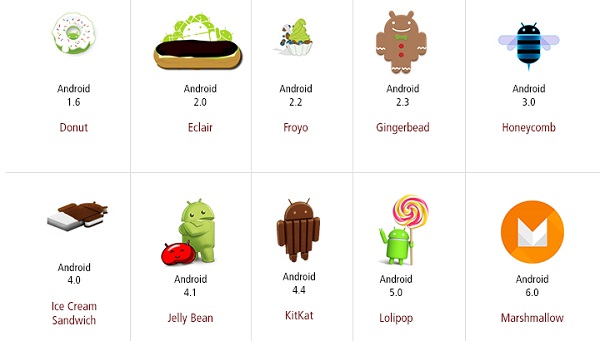
The code names of android ranges from A to N currently, such as Aestro, Blender, Cupcake, Donut, Eclair, Froyo, Gingerbread, Honeycomb, Ice Cream Sandwitch, Jelly Bean, KitKat, Lollipop and Marshmallow. Let’s understand the android history in a sequence.

Jistory